Reaction and comprehension
Concepts and copy
Messages, labels, positioning, navigation ideas, and early flows, before design or build.
What gets captured
Tasks, ratings, open-endsIncluded
Face and voiceOptional
First-click and heatmapsNot applicable

 UX & Usability Testing in BEYOND Qual Studios™
Run moderated and self-run studies across concepts, prototypes, and live experiences. Connect every task, metric, issue, clip, participant segment, product version, and retest in one governed workspace. Participant links are mobile-friendly for supported studies, with optional face and voice recording.
Start with one moderated round or one self-run study. Use your own participants, recruit independently, or invite qualified respondents from a connected BEYOND survey.
Read the UX testing guide →Take the same 3-minute usability study a participant would: work real tasks on a live prototype, then see it roll into a scorecard.
One research workflow across early ideas, static screens, interactive prototypes, and working digital experiences. Define the task and success criteria once, capture ease and confidence, collect the participant's reasoning, and retest the next version without rebuilding the study. Each card shows exactly what gets captured.
Messages, labels, positioning, navigation ideas, and early flows, before design or build.
Layouts, page hierarchy, content, creative, and alternative visual directions.
Realistic tasks on a BEYOND-hosted prototype, or on a capture-enabled Figma prototype, with behavior tied to the task.
Real journeys in staging or production, with task measures and the participant explaining as they go.
Behavioral capture runs on BEYOND-hosted and capture-enabled Figma prototypes. Live-site behavioral capture is in development, so live sites are tested today with moderated tasks, ease measures, and participant explanation.
Recruit from survey respondents, carry segment and prior-answer context into the study, and move task evidence, issues, clips, and retest results into the same reports and dashboards as the rest of the research. The screener, demographics, tasks, ease ratings, and open-ends run as one study on the BEYOND platform.
The moderator cockpit during a live session: the scenario pushed to the participant, the full outcome taxonomy for scoring each task, and quick tags plus a timestamped note stream for issues and quotes. The panel mirrors the participant's prototype screen only; the video call never appears here.
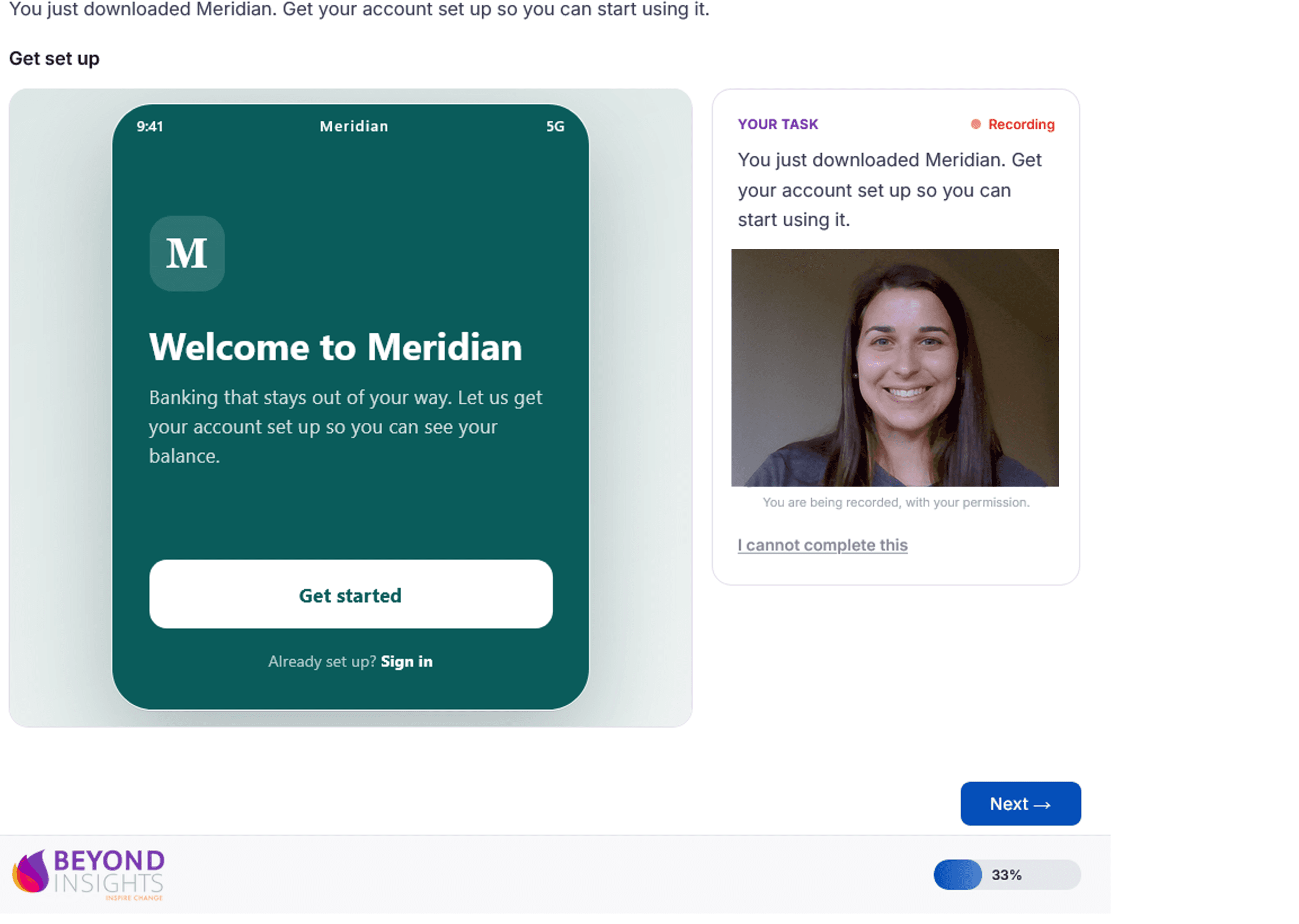
The participant sees only their task, pushed to their screen, and works through it on the product itself. One ease question follows each task, with a short why probe when it was hard. Nothing about scoring, tags, or the backroom reaches them.
The participant view during a self-run task: the task and goal on the left, the tested prototype on the right, and a finished button. One ease question follows, and the moderator backroom is never visible here.
Gold = UX testing instruments. Dashed = between-session activities. UX task cards run beside the full Qual Studios exercise library.
Whether our researchers run it or yours do, one governed chain ties each finding back to the person, the moment, and the version, and forward to the recommendation and the retest.
Scenario plus goal, never steps. The task check blocks step-by-step and leading language before any participant sees it.
In the live cockpit, or unmoderated from a link. Outcomes scored on a full taxonomy, and ease captured after every task.
Severity with written rationale, participant incidence, and clip evidence. Expert findings labeled as expert findings, never dressed up as participant data.
Clone the round onto the new version. Resolved, persistent, or regressed, with fresh evidence.
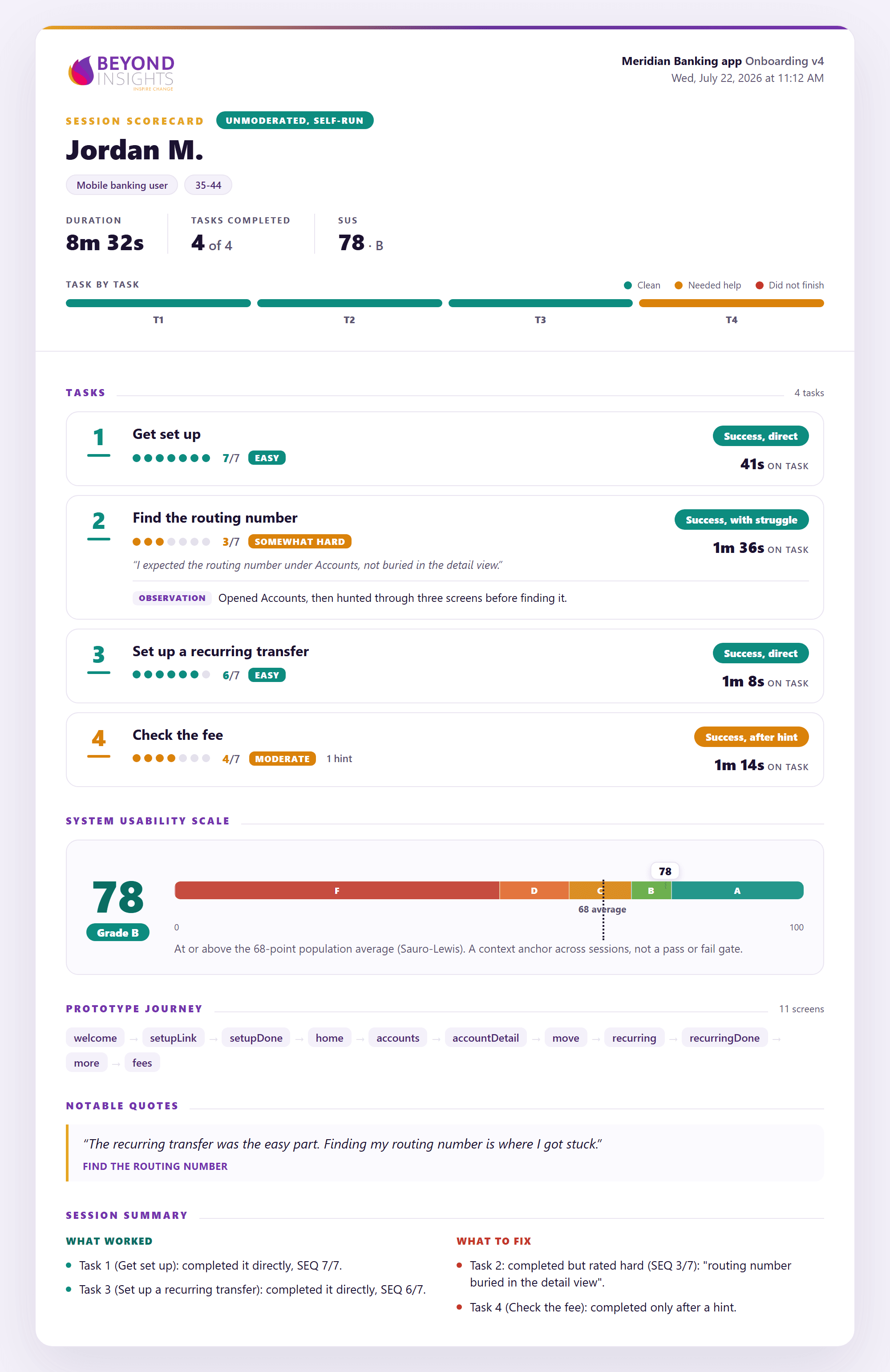
Participants looked for it under Accounts, where the label never appears. A researcher set the severity and recorded the reasoning beside it, so a number is never the only thing standing behind a finding.
I expected the routing number under Accounts, not buried in the detail view.
Quick validation and deep research used to mean two tools. Here they share one method, one evidence chain, and one set of scorecards.
Send a branded link and participants complete real tasks on their own, on your prototype. The platform captures the behavior automatically.
A moderator runs the session while the participant works on a live mirror of your prototype, with no screen-share leak.
It runs the full arc of a real study, welcome to wrap-up, so participants treat it like one. The open-ends even tailor themselves when someone gives up.
Same evidence chain, same scorecards, one dataset.
Begin with the core tasks, outcome measures, ease ratings, and close-out questions already in place. Remove what the study does not need, adapt what it does, and add project-specific questions without starting from a blank page. Reusable blocks come from the BEYOND repository, so each round stays comparable to the last.
On every study, automaticallyScenario and goal for each task, straight from your study contract.
The ten-item System Usability Scale, scored zero to one hundred.
Any question your study needs sits beside the standard blocks and lands on the same scorecard, in the same evidence chain.
Standard and custom blocks alike are drawn from the BEYOND repository: your reusable questions, scales, and screeners in one governed place, so a choice made once becomes the default next time.
Choose the questions once, and every study after it starts a step ahead.
Bring your own customers or employees, invite qualified respondents from a connected BEYOND survey, or recruit through BEYOND's consumer and B2B fielding network. Screening, quotas, scheduling, consent, technical readiness, reminders, and participant status stay connected to the same study.
Invite customers, employees, members, or existing product users through secure study links. You keep the relationship; BEYOND manages access, status, reminders, and evidence.
Recruit directly from a BEYOND survey by segment, behavior, prior answer, or qualification, with only project-approved context carried into the session. Moderators see only what the study approves.
Reach consumer and B2B participants beyond your base, with defined targets, quotas, device and browser needs, and accessibility context.
The sample follows the decision. Run a focused formative round, compare defined audiences, or scale to a larger unmoderated validation study, all on the same platform.
Qualified studies can begin within days, with timing set by incidence, target complexity, study mode, and sample requirements.
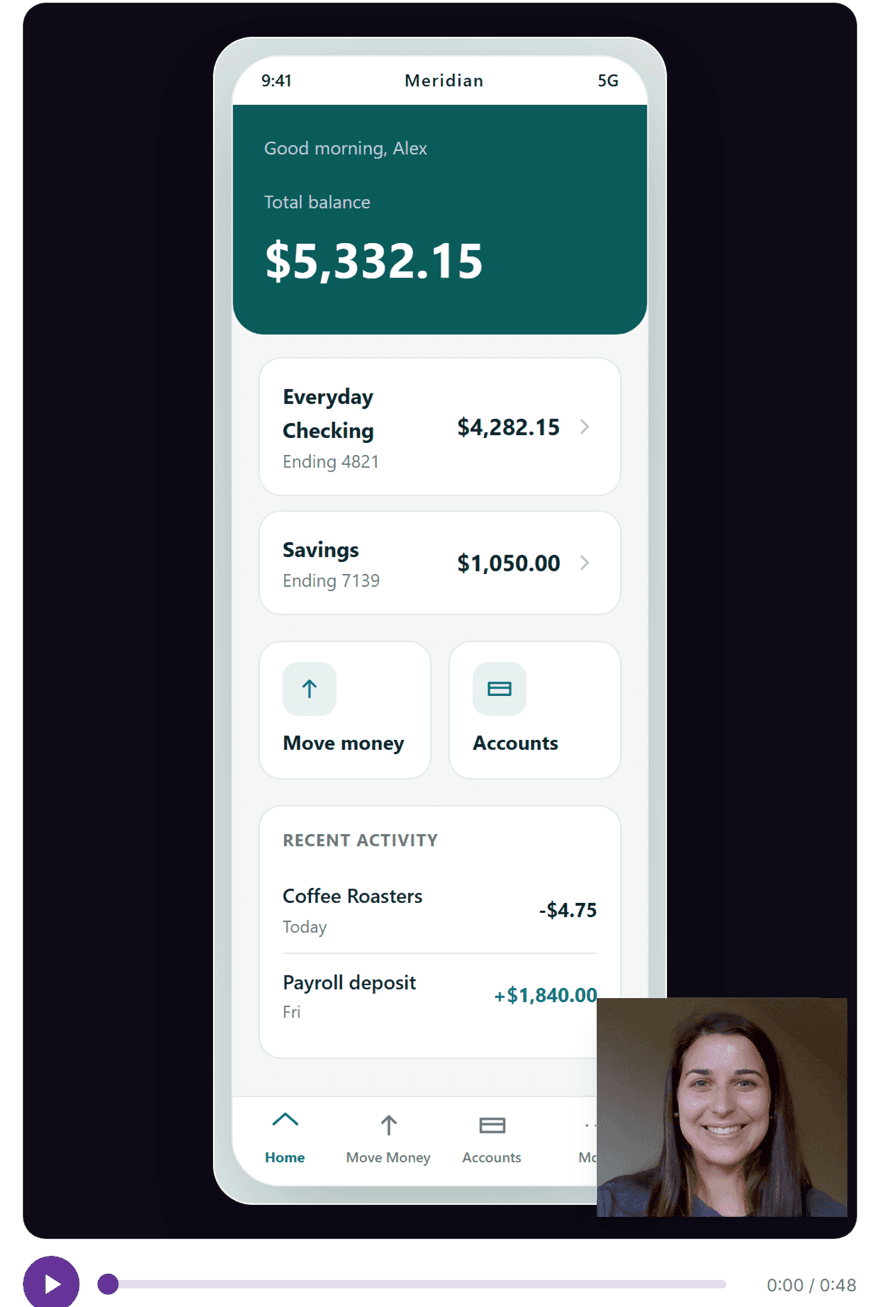
On in-app prototypes, and on client Figma prototypes with a lightweight capture step enabled, interaction events generate first-click, paths, and heatmaps with no recording required, and that behavioral layer scales beyond a moderated round. When a participant opts in, they record their face and voice and see a live self-view, so they never have to expose the rest of their desktop. We save the interaction stream separately and reconstruct the journey against the tested version, then play it back in the cockpit as one picture-in-picture, their reactions synchronized with the screens they moved through.
Behavioral metrics do not require face or voice recording. When recording is enabled, it is opt-in with a live self-view, and researchers configure recording, retention, access, and deletion by study.
Opt-in, consent-tracked, yours to retain or delete.
In small formative rounds, counts lead. When percentages appear they stay secondary and always carry the denominator, so a round of six never reads as population precision. We say exactly what happened, including who needed help and who never got there.
Standard instruments come built in. SEQ captures perceived ease after every task, and SUS captures overall usability at the end of the session. Published averages are context for reading your scores, never pass or fail lines.
The width of the confidence interval is part of the finding.
Every study lands as a scorecard. One per participant, one for the whole round, and for self-run studies, the behavior behind the numbers. Each is defensible on its own and traces back to the sessions that produced it.
Outcome, ease, and time on every task, with the participant's own quotes, the issues and observations they surfaced, their SUS score and grade band, the full prototype journey they took, and a plain what-worked versus what-to-fix summary.
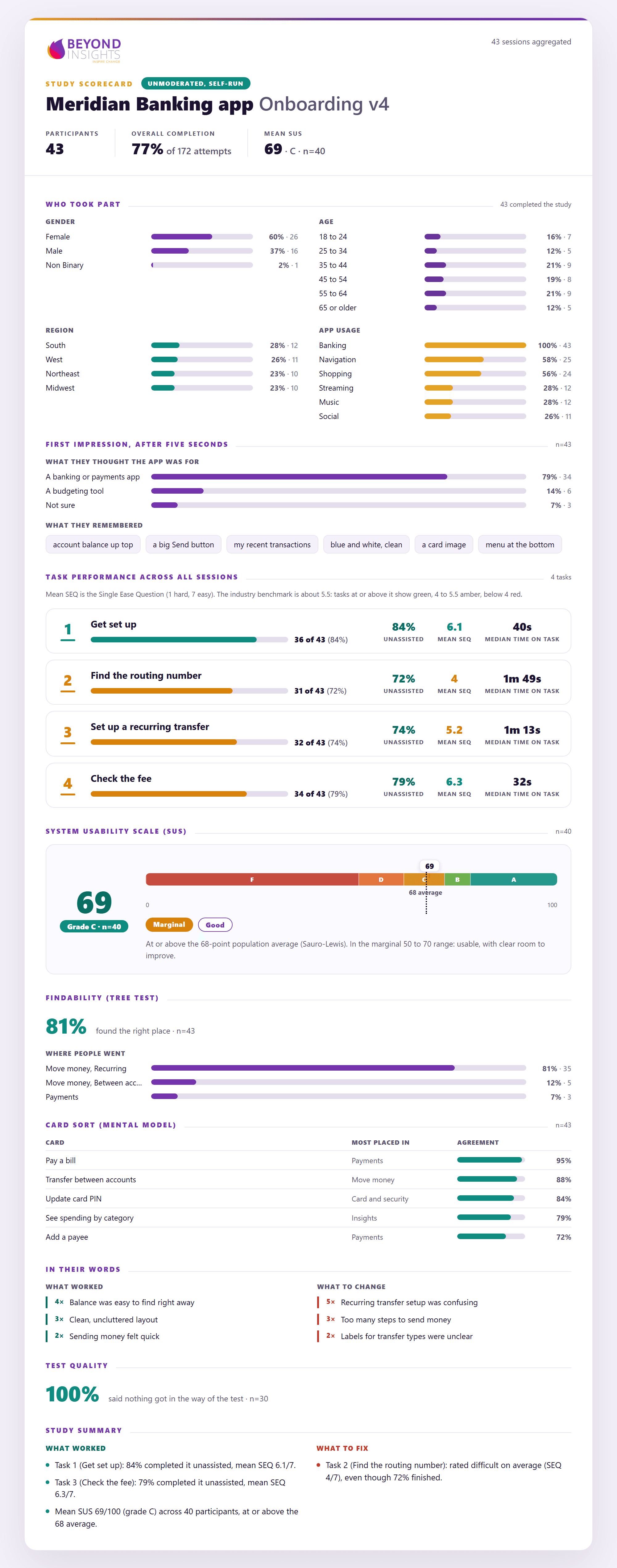
The whole round in one readout: who took part, the five-second first impression, per-task completion and unassisted success against the SEQ benchmark, the SUS grade curve, findability, the card-sort mental model, verbatims, and test quality, closing on what worked and what to fix. The same honest scoring as the session, at the level a stakeholder decides on.
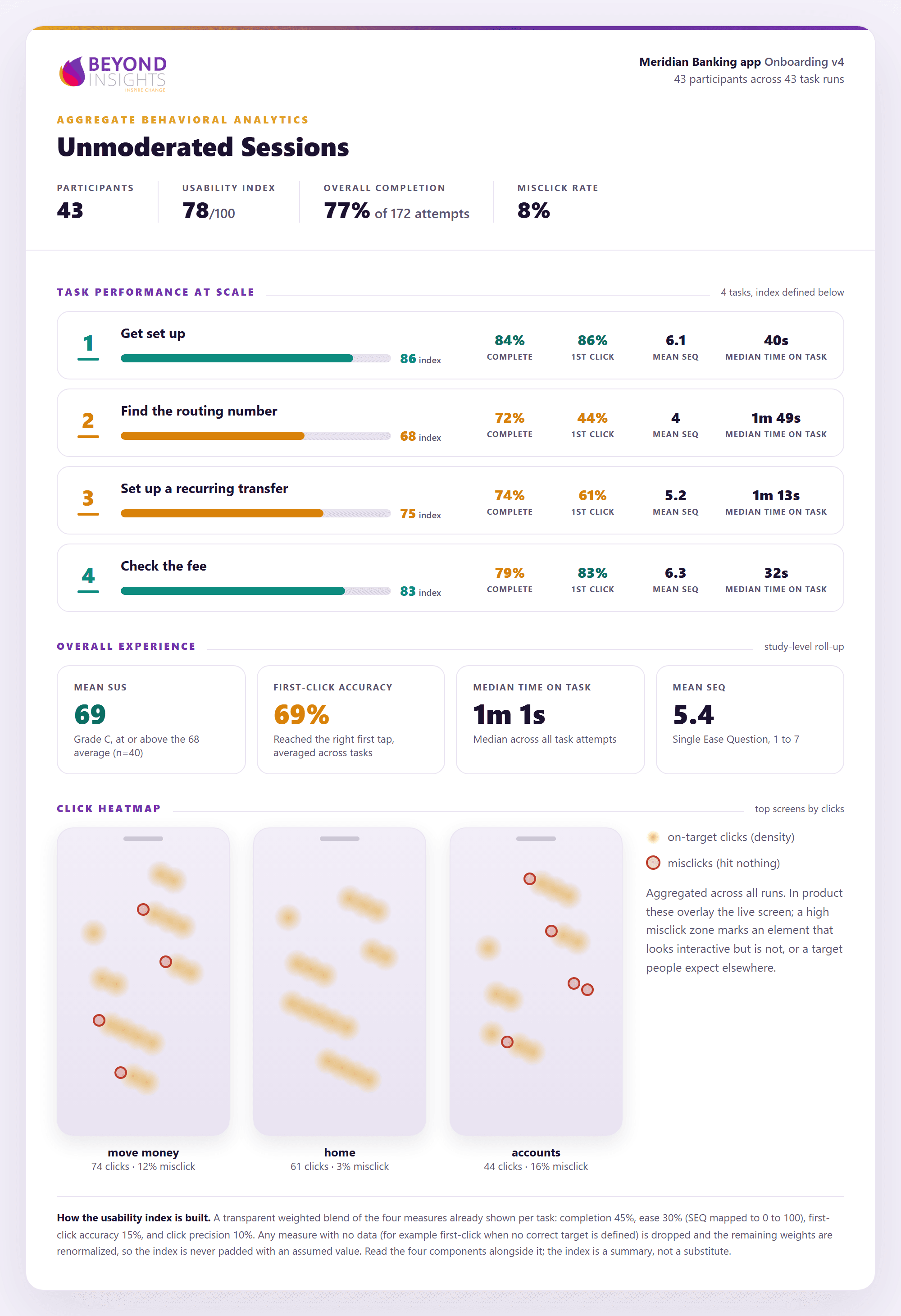
For large unmoderated studies: a composite usability index, per-task completion with first-click accuracy and misclick rate, mean ease and median time, and click heatmaps that show where attention and confusion land, screen by screen.
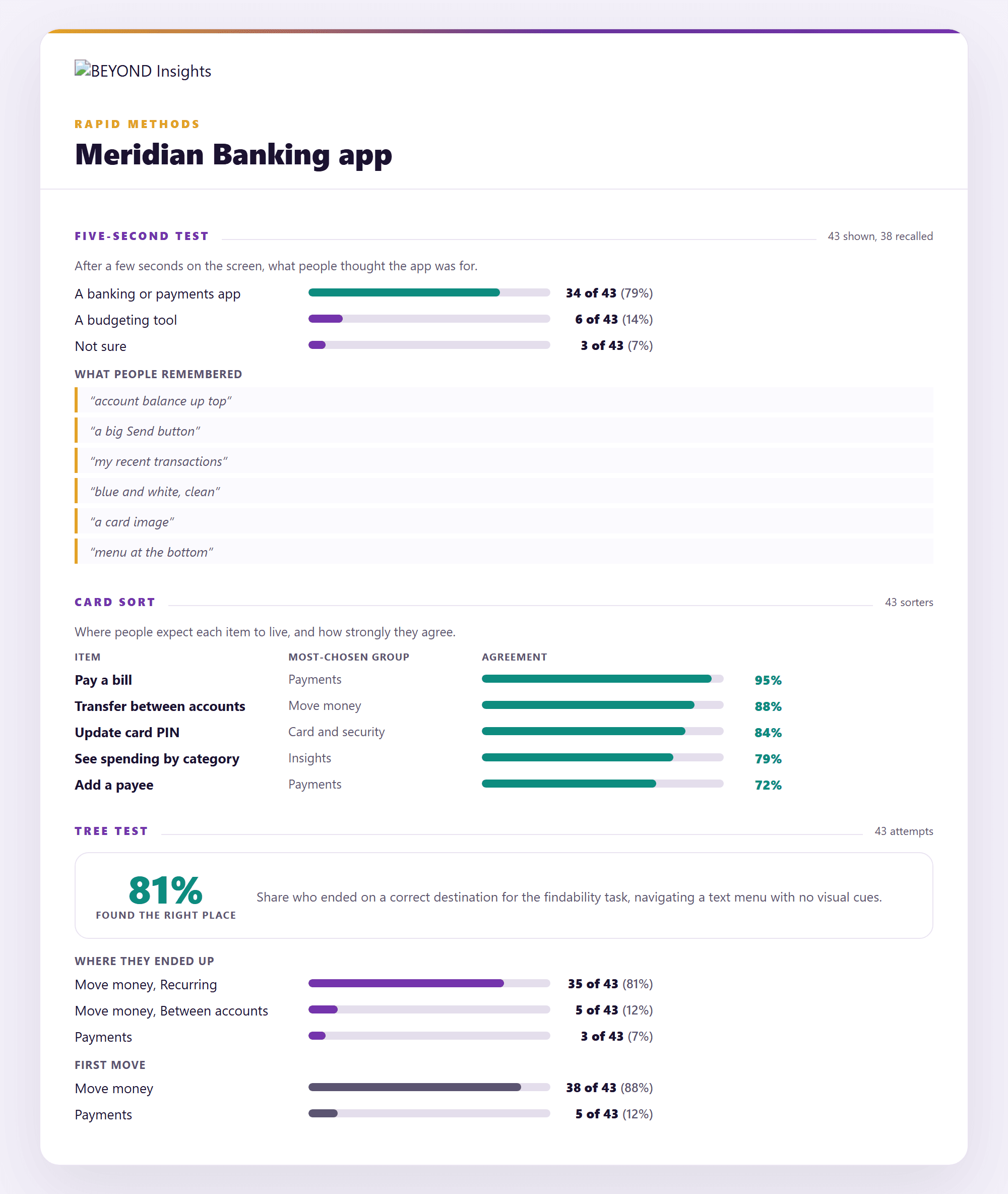
Five-second tests, card sorts, and tree tests come back on the same scorecard footing: what people thought the screen was for and what they remembered of it, where they expect each item to live and how strongly they agree, and whether they can actually find it in the structure you are proposing.
The issue report (prioritized, severity-rated, evidence attached) and the highlight reel ship alongside, and every output ships as interactive HTML, PowerPoint, or your preferred format and flows into BEYOND reports and dashboards. No parallel toolchain, no export gymnastics.
A finding is only half the job. Clone the round onto the new version and run the same tasks again, and every issue comes back labeled, with the before and after together. What a product team actually needs to know is whether the change fixed the problem without creating a new one. This answers that.
Every issue from the prior round is re-run and re-labeled, so improvement is measured, not asserted. The tasks and wording stay fixed across rounds, so a change here is a change in the design, not the test.
Moderated and self-run usability tests, diary studies, card sorts, tree tests, accessibility sessions, expert reviews, and concept reactions, all in the same place.
Participants work through tasks on their own from a link, with clicks and paths captured automatically, or live on your product or prototype with screen, camera, and voice.
How people actually use it over days or weeks, captured in the moment on shared boards.
The classic ways to find out where people expect things to live, run and analyzed here.
First reactions to a concept or a direction, before you commit to building it.
Sessions run with assistive technology, scored like any other round, plus a specialist review of your flows, always labeled as expert findings.
AI speeds the work our researchers used to do by hand, and every draft is reviewed before it reaches you. Faster turnaround, without handing your study to a black box. Each card below shows what the machine drafts and who signs it off.
Drafted from your objectives and the decision the study supports, in the platform's own task and question formats.
Logic, quotas, and terminations built from the approved screener, then checked back against the specification.
Every session transcribed and coded, with each moment timestamped against the task it belongs to.
Recurring behavior grouped into candidate themes across participants, tasks, and sessions.
A structured first draft with the evidence already attached to every point it makes.
Assembled from the moments tagged live during the session, ready for a researcher to trim.
Every draft is reviewed by the person whose name goes on the work.
Run the platform with your own team, bring in BEYOND specialists for the stages you want covered, or have our researchers run the study for you.
Build and run templated rounds yourself, with in-product method checks and specialist support available for advanced designs.
Your researchers own the study; our specialists support moderation, analysis, and quality along the way.
BEYOND designs the study, moderates the sessions, and delivers the findings. You bring the product and the decision.
Pricing follows commitment; single rounds are always welcome.
Usability sessions involve real people and real screens. The guardrails are not an afterthought, they are the product.
Participants see exactly what is recorded and can pause sharing at any time. A preflight privacy routine runs before any screen share begins.
Clicks and screens are captured automatically to power the analytics, no recording required. On opt-in, the participant records face and voice with a live self-view and no screen-share; the screen is reconstructed from behavior, so no screen video is stored. Always with consent, no keystroke logging, no DOM surveillance.
Participant, task, timestamp, clip, and product version on every finding. If it cannot be traced, it does not ship.
The BI Agent drafts summaries and clusters observations. It never moderates a session, never assigns final severity, and never publishes without researcher approval.
First-attempt behavior is preserved. Researchers configure whether retries are allowed, and any repeat attempts stay separate from the original result.
A clear recording indicator throughout, pause and stop in the participant's hands, and a separate, optional permission before any clip is used in a demo or a presentation.
Recordings, clips, and transcripts follow your project policy for retention and deletion. Your data stays yours.
Concepts and copy before anything is designed, static screens and images, interactive prototypes hosted in BEYOND or in a capture-enabled Figma file, and live websites and web apps. Behavioral capture, meaning first-click, paths, and heatmaps, runs on the prototypes. Live-site behavioral capture is in development, so live sites are tested today with moderated tasks, ease measures, and the participant explaining as they go.
No. When a participant opts in they record their face and voice and see a live self-view, so they never expose the rest of their desktop. The interaction stream is saved separately and the journey is reconstructed against the tested version, then played back in the cockpit as one picture-in-picture. No screen video is stored.
Small formative rounds are the norm, and they are reported as such. Counts lead, and when percentages appear they stay secondary and always carry the denominator, so a round of six never reads as population precision. Assisted completions are never folded into clean success.
Your own users, respondents from a connected BEYOND survey along with the segment and prior-answer context they already carry, or broad consumer and B2B audiences recruited for you. Moderated sessions are recruited and scheduled; unmoderated fielding is quota-managed.
A scorecard per session, one for the whole round, and for self-run studies the behavior behind the numbers, plus a retest comparison when you run the next version. Delivered as interactive HTML, PowerPoint, or your preferred format. Every finding carries the participant, task, timestamp, clip, and product version behind it.
It drafts guides and screeners, transcribes and codes sessions, clusters recurring behavior into candidate themes, drafts toplines, and assembles highlight reels from moments tagged during the session. It never moderates a session, never assigns final severity, and never publishes without researcher approval. Every draft is reviewed by the person whose name goes on the work.
Replace weeks of internal debate with direct evidence from the people who use the experience. See the workflow on your own product or prototype.
Start with one round. No platform migration required.


